


Upload Standard Report Data to AL11 Using SUBMIT Program
Most of the Standard report transaction codes do not have the option to upload the report data to the Application server (AL11), it can be achieved by using a wrapper program of the standard Tcode using SUBMIT program.
Blog content:
Take the standard tcode FBL5N. Have the selected input parameters from FBL5N to the selection screen of the wrapper program. There are options to upload to an application server or display.
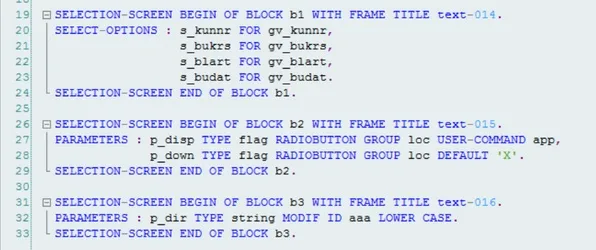
Img: 1
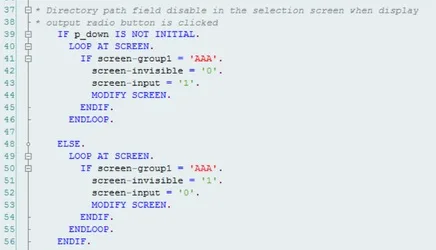
Img: 2
In our case we had certain parameters in the dynamic selections, so we used the Function module FREE_SELECTIONS_RANGE_2_EX to the format which can be used in SUBMIT program
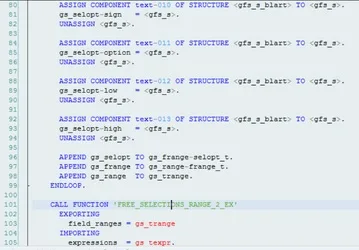
Now pass the selection screen parameters to the standard program of FBL5N which is RFITEMAR using the SUBMIT along with dynamic selections.
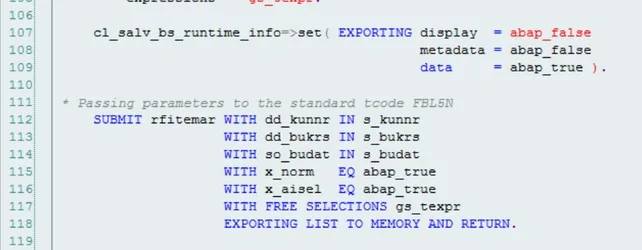
Push report output to AL11 faster.
Img: 3
To pass the data now from memory to our internal table, need to use a class method CL_SALV_BS_RUNTIME_INFO=> GET_DATA_REF, once we get the report data in the internal table GR_DATA, we can get the required fields and can appended to our local final internal table to display or upload to application server.
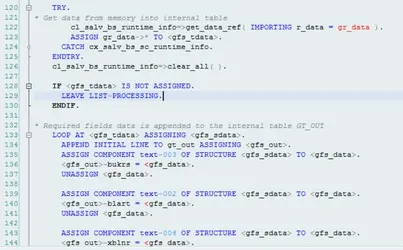
Img: 4
Used factory method of CL_SALV_TABLE to display

Img: 5
Used OPEN DATASET, TRANSFER, CLOSE DATA SET to upload the data to the Application server.
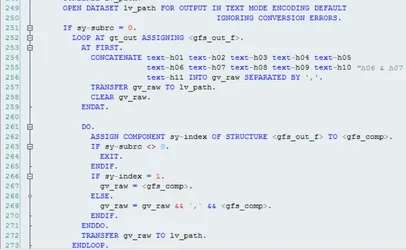
Let’s run the program and see if it works…
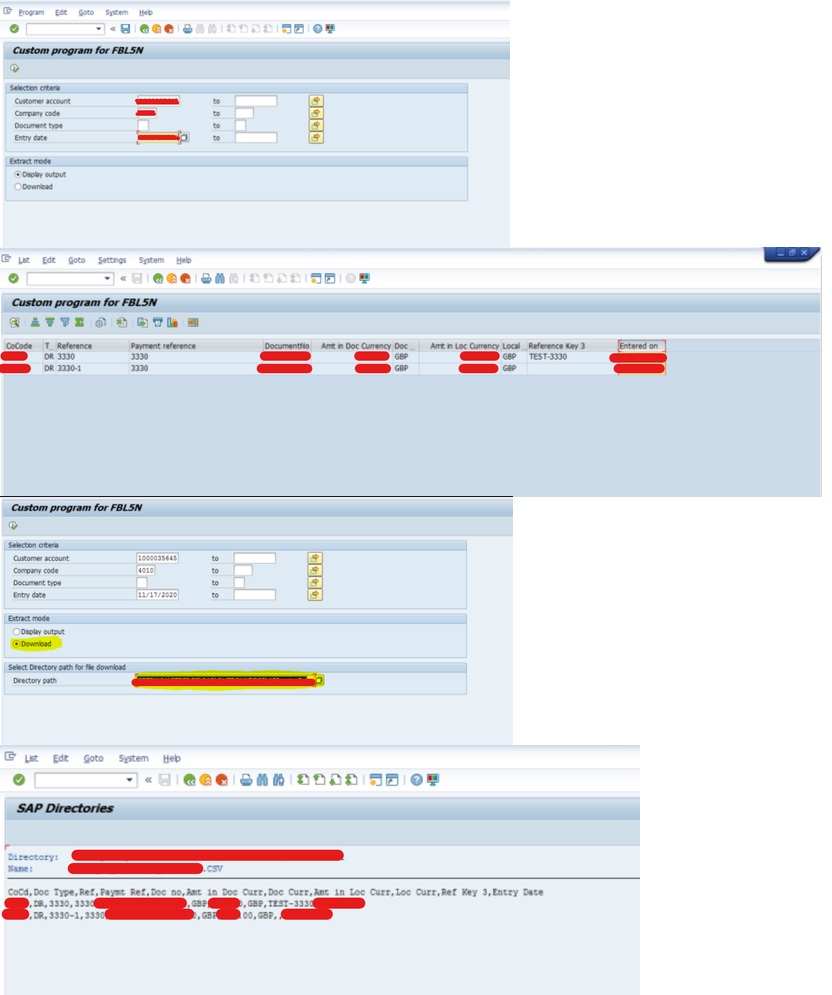
Conclusion:
We can call any standard program using SUBMIT and export the data from memory. Based on our requirements, we can upload data to an application server, presentation server, or pass it to a function module. for more details visit our website mobolutions
FAQs:
What is AL11 in SAP and what is it used for?
AL11 is the SAP transaction used to display (and navigate) application-server directories that SAP exposes via directory parameters (e.g., DIR_TRANS, DIR_TEMP). Teams use AL11 mainly to confirm the server path where interface files live (inbound/outbound), and to verify files exist after an ABAP program writes to the application server.
What is the SUBMIT statement in SAP ABAP?
SUBMIT is an ABAP statement that executes another executable report/program from your program—optionally passing selection-screen values, running it in a new internal session, and controlling what happens to the report output (display, spool, or memory). In other words, it’s how you “call a report like a function,” without rewriting the standard report logic.
How can a standard SAP report be executed using SUBMIT?
You do it in three steps:
- Identify the underlying report program behind the standard transaction (many tcodes are just a wrapper that calls an executable report).
- Pass the required selection parameters (direct WITH …, a selection table, or a saved variant).
- SUBMIT the program and return control to your wrapper program to continue processing.
Our example uses FBL5N (customer line items) and submits the underlying program RFITEMAR, passing parameters/dynamic selections via the wrapper.
Can standard report output be saved to AL11 using ABAP?
Yes, that’s the core idea of your blog.
- You build a wrapper report that runs the standard report via SUBMIT.
- You capture the output (either as list output “exported to memory” or, for ALV outputs, via runtime capture).
- You then write the extracted data as a file to the application server directory (visible via AL11) using ABAP file I/O (OPEN DATASET → TRANSFER → CLOSE). Your blog explicitly calls out using CL_SALV_BS_RUNTIME_INFO=>GET_DATA_REF to pull report data into an internal table and then using OPEN DATASET / TRANSFER / CLOSE to upload to the application server.
What permissions are required to write files to AL11?
Writing a file to an AL11 directory is essentially writing to the application server file system, so permissions usually involve both SAP authorizations and OS access:
SAP authorization checks for file access
- S_DATASET: checked when ABAP opens/deletes datasets (e.g., OPEN DATASET). It typically governs activity + file name pattern + (often) program context. SAP Help Portal+2SAP Community+2
- S_PATH: used to restrict access by directory/path authorization groups (commonly used to protect specific folders). SAP Support Portal+1
Directory must be exposed/maintained for AL11
AL11 directories are tied to directory parameters (the “logical” directories SAP shows), so the target path must be appropriately defined/available in the system configuration. abapcadabra.com+1
OS-level write permission
Even with SAP authorizations, the underlying OS user running the application server needs write access to that folder.
Automate AL11 uploads with ABAP SUBMIT
Generate, format, and write report output to AL11 reliably using controlled background execution. Reduce manual file handling, improve traceability, and standardize output for downstream interfaces.